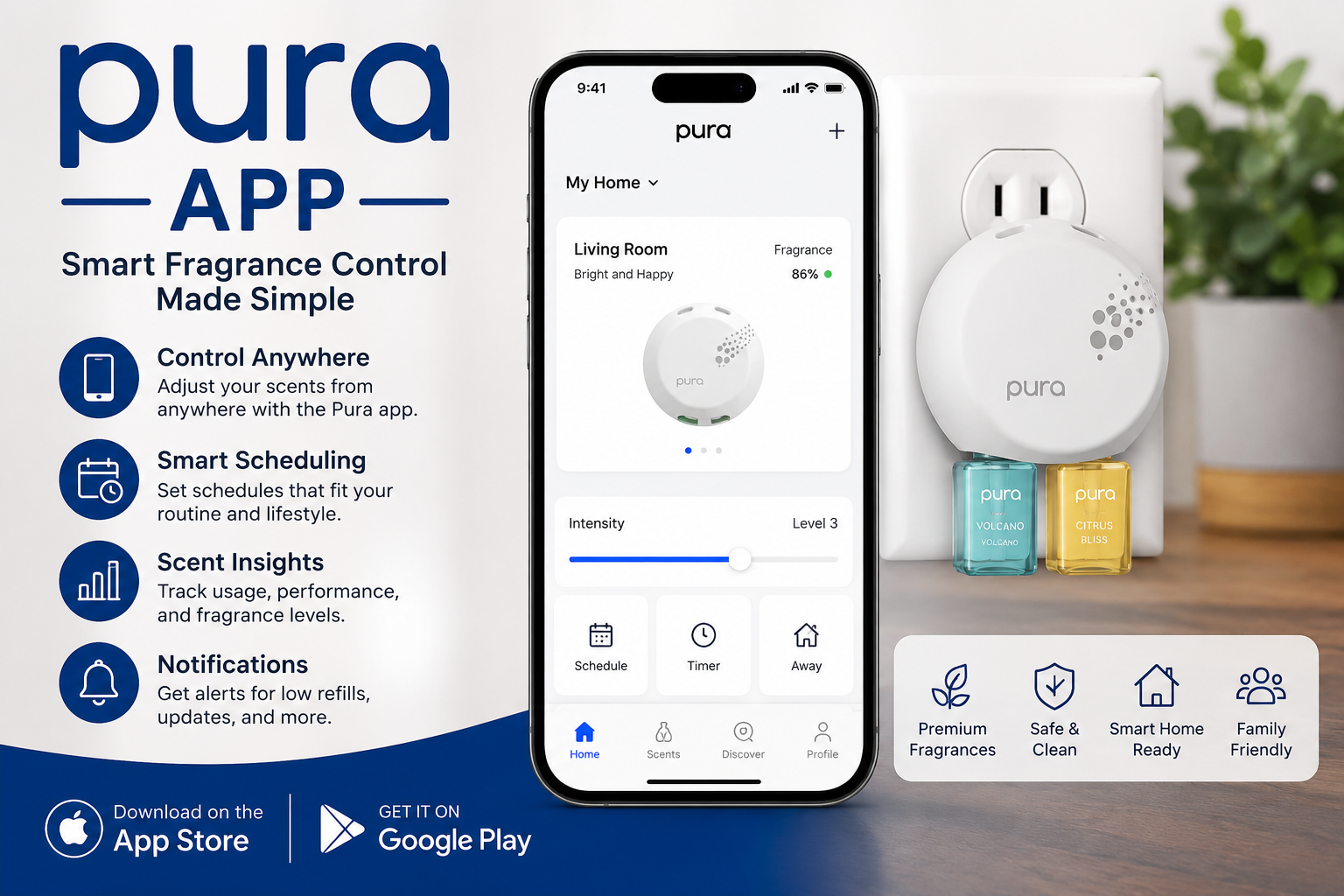
Imagine walking into your home after a long day and feeling a gentle, pleasant smell that makes you relax right away. Many people want fresh air in their houses, but they do not like spraying things all the time or dealing with strong chemical smells. This is where smart fragrance tools come in. The Pura app is a simple phone tool that helps you control special devices called smart diffusers. These devices spread nice scents in your home or car without any extra work from you. In this complete guide, you will learn everything about the Pura app in easy steps. You will see how it works, why it can help your daily life, and how to use it well.
Why Smart Fragrance Control Matters Today
Life moves fast these days. People come home tired from work, school, or errands. They want their spaces to feel calm and welcoming. Old ways of making rooms smell good, like candles or plug-in refills, need constant attention. You might forget to turn them off or run out of scent too soon. Smart fragrance control changes that. With an app on your phone, you can set everything once and then enjoy it every day. This means less waste and more comfort. The Pura app makes this easy for anyone, even if you are not good with technology. After that, your home can have the right smell at the right time, like fresh citrus in the morning or soft lavender at night.
Another thing is that good scents can lift your mood. For example, some people feel happier with light floral smells during family time. Others like clean, woody notes when they have guests. Smart control lets you match scents to your life without guessing. Over time, this small change can make your house feel like a special place you love coming back to.
Getting Started with the Pura App
First, you need the right device. Pura smart diffusers are small plugs that fit into your wall outlet. There are versions for home rooms and even for your car. Next, download the Pura app from your phone store. It works on most common phones. After you open the app, you make a free account. This step is quick and safe. The app then guides you to connect your diffuser.
Plug the diffuser into a wall outlet. Make sure it stands straight up so it works best. The app looks for the device using Bluetooth at first. Stay close to it, about five feet away. Once it finds the diffuser, follow the simple steps on your screen. You can name the room, like “living room” or “bedroom.” This helps later when you have more than one diffuser. Because the app connects to your Wi-Fi, you can control everything from anywhere in your house or even when you are away.
Inserting the scent is the fun part. Pura uses special vials filled with clean fragrances. The smart ones tell the app what scent is inside automatically. Just push the vial in gently. After that, the app shows the name and lets you start right away. This automatic detection saves time and avoids mistakes.
Main Features of the Pura App
The Pura app gives you full control over your fragrance experience. One important feature is adjusting scent intensity. You can choose low, medium, or high. For example, use low in small rooms so it feels gentle. In bigger spaces, medium or high spreads the smell nicely without being too strong. This means you save fragrance and money over time.
Next, scheduling is very helpful. You can set timers so the diffuser turns on in the morning when you wake up and turns off at night. Maybe you want a bright, energizing smell from 7 a.m. to 9 a.m. Then switch to something calm in the evening. The app lets you create different schedules for different days. On weekends, you might want longer times. Because of these custom options, your home always feels fresh exactly when you need it.
Ambient light colors add another nice touch. The diffuser has soft lights that you can change to match your mood or room. Pick warm yellow for cozy nights or cool blue for focus time. This turns the device into a small night light too. In addition, there is an away mode. When you leave home, the app can stop the scent to save your vials. When you come back, it starts again. These small details make daily life smoother.
For families, the scents are made to be safe around kids and pets when used as directed. Many people enjoy mixing scents for different areas. One room can have a bakery-like vanilla while another has fresh ocean air. The app makes switching easy.
How to Set Up Schedules and Customize Your Experience
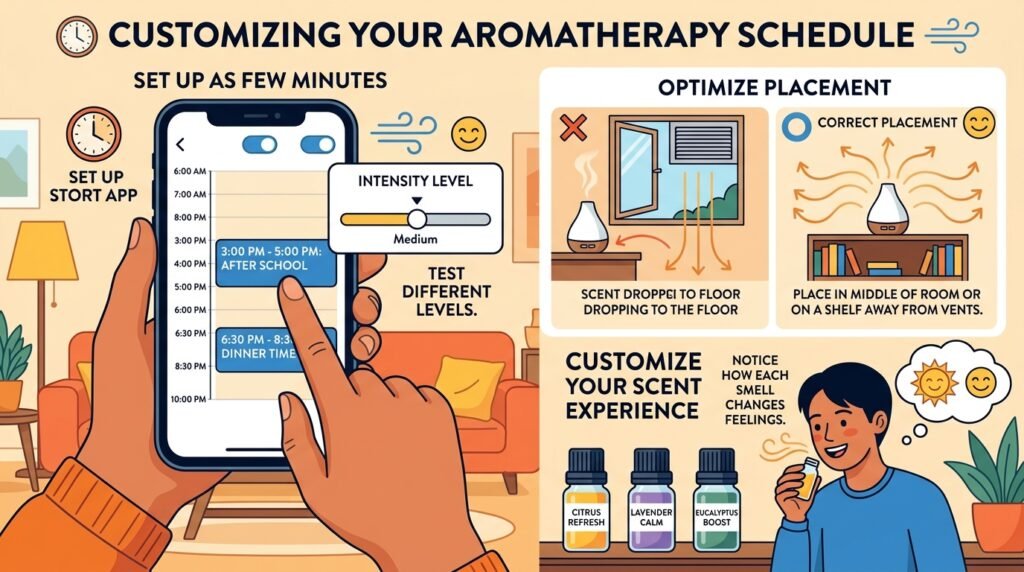
Setting up a schedule takes just a few minutes. Open the app and find your diffuser. Tap on the schedule button. Choose start and end times. Pick the intensity level. You can add more than one time block in a day. For instance, turn it on for two hours in the afternoon when kids come home from school. After that, add another block for dinner time. Test different levels to see what feels best for your nose.
Customization goes further. The app remembers your favorite settings. Over time, it becomes quicker to change things. Another useful tip is to place the diffuser away from direct air vents or open windows. Cool air can make the scent drop to the floor, so you smell less. Put it in the middle of a room or on a shelf where air moves naturally. This simple placement trick helps you enjoy the fragrance more.
Many users also like to explore new scents. Start with small collections to try different ones. Notice how each smell changes your feelings. A citrus scent might wake you up better than coffee some days. Soft woods can make movie nights feel relaxing. Because the vials last a good while with smart scheduling, you do not need to replace them often.
Using the Pura App for Different Spaces
The app works well for homes of all sizes. In a small apartment, one diffuser can cover the main living area. In bigger houses, add more devices in bedrooms or the kitchen. The app shows all your diffusers in one list. You can control them together or one by one. This is great for families who want different smells in different rooms.
For car use, there is a special version. Plug it in while driving, and the app controls intensity from your phone. Many people enjoy a clean scent during long trips. It helps reduce any stuffy car smells. Just remember to turn it off when you park to save the fragrance. The same scheduling ideas work here too, but shorter times usually feel better in small car spaces.
Common Tips for Best Results
To get the most from your Pura app, keep your phone and diffuser updated. The app sometimes adds new helpful features. Check the settings section for any new options. Also, clean the area around the diffuser every so often so dust does not block the scent.
If you travel a lot, use the away mode. This stops the device when no one is home. When you return, turn it back on with one tap. Another good idea is to share access with family members. Create accounts for them so everyone can adjust the home scents.
Pay attention to how your body feels. Some people are sensitive to smells. Start with low intensity and increase slowly. This way, you find what is comfortable. Real-life example: A busy mom set her living room diffuser to run lightly during homework time. The soft smell helped her kids focus without anyone noticing strong perfume. Small changes like this add up to better days.
Troubleshooting Simple Problems
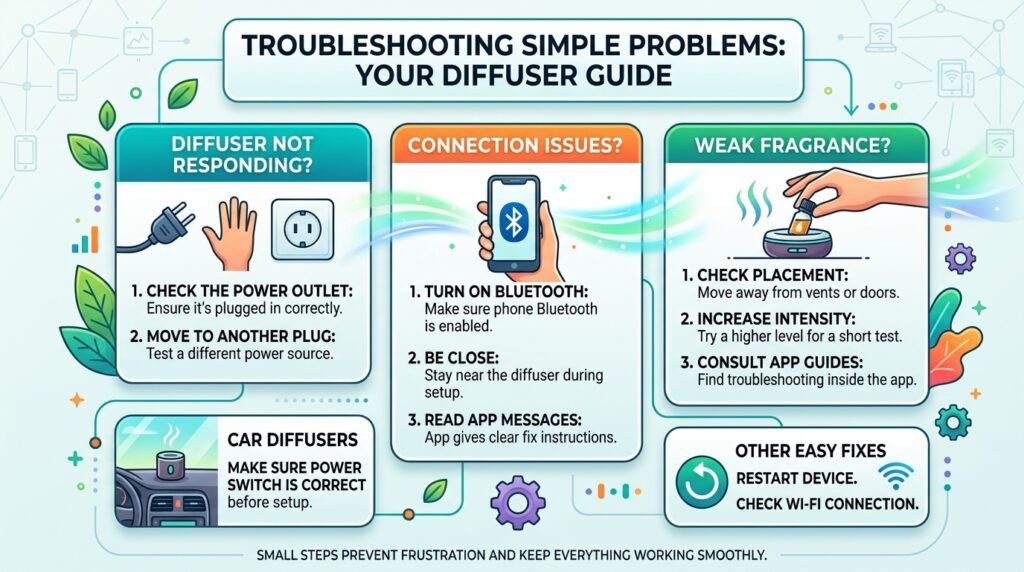
Even good tools can have small issues sometimes. If the diffuser does not respond, check the power outlet first. Move it to another plug and try again. Make sure your phone Bluetooth is on and you are close when connecting. The app usually gives clear messages to help fix things.
If you cannot smell the fragrance well, check the placement. Move it away from vents or doors. Also, try higher intensity for a short test. Vials should last weeks with proper use. If something seems wrong with the scent level, the app has guides inside. Most problems have easy fixes, like restarting the device or checking Wi-Fi.
For car diffusers, make sure the power switch is correct before setup. These small steps prevent frustration and keep everything working smoothly.
FAQ About the Pura App and Smart Fragrance
How do I download and start using the Pura app?
Go to your phone’s app store and search for it. Install, make an account, and follow the setup steps with your diffuser plugged in. It takes only a few minutes.
Can I control multiple diffusers with one app?
Yes. Add each device one by one. The app shows them all clearly so you can manage home and car from the same place.
Is the app free to use?
The basic app is free. You buy the diffusers and scent vials separately. Schedules and controls do not cost extra.
Does it work with voice helpers like Alexa?
Many users connect it to popular smart home voice tools for hands-free commands, like turning scents on or off with your voice.
What if I forget to turn off the diffuser?
The away mode and timers help automatically. You can also check and control it from your phone no matter where you are.
Are the scents safe for everyday use?
Pura focuses on clean formulas. Follow the instructions and start with low settings, especially with children or pets around.
How long do the fragrance vials last?
With smart scheduling, one vial can last many weeks. Actual time depends on intensity and room size. The app helps you track usage.
Final Thoughts on Smart Fragrance Control
The Pura app brings simple technology into your home to make everyday smells better. From easy setup to custom schedules, it gives you control without extra effort. You can create moods, save fragrance, and enjoy fresh spaces that match your life. Whether you live in a small apartment or a big house, these tools help turn ordinary rooms into comfortable places. Try different scents and settings to discover what works best for you and your family. In the end, small improvements in your environment can bring more joy to your daily routine. Take time to explore and enjoy the difference a well-scented home can make.
Disclaimer: This article provides general information based on publicly available details about smart fragrance apps and devices like Pura. It is for educational purposes only and does not promote any specific brand, product, or service. Always check the latest official instructions, safety guidelines, and terms from the manufacturer before using any device or app. Results may vary by user, home setup, and location. This content is not affiliated with any company and aims to help readers understand the topic neutrally.
Explore More:
Cash App Unsolicited Text Message Settlement: Eligibility, Payout Dates & Claim Process
Buy Verified Cash App Account – Secure & Fully Verified Accounts for Instant Use
About the Author